
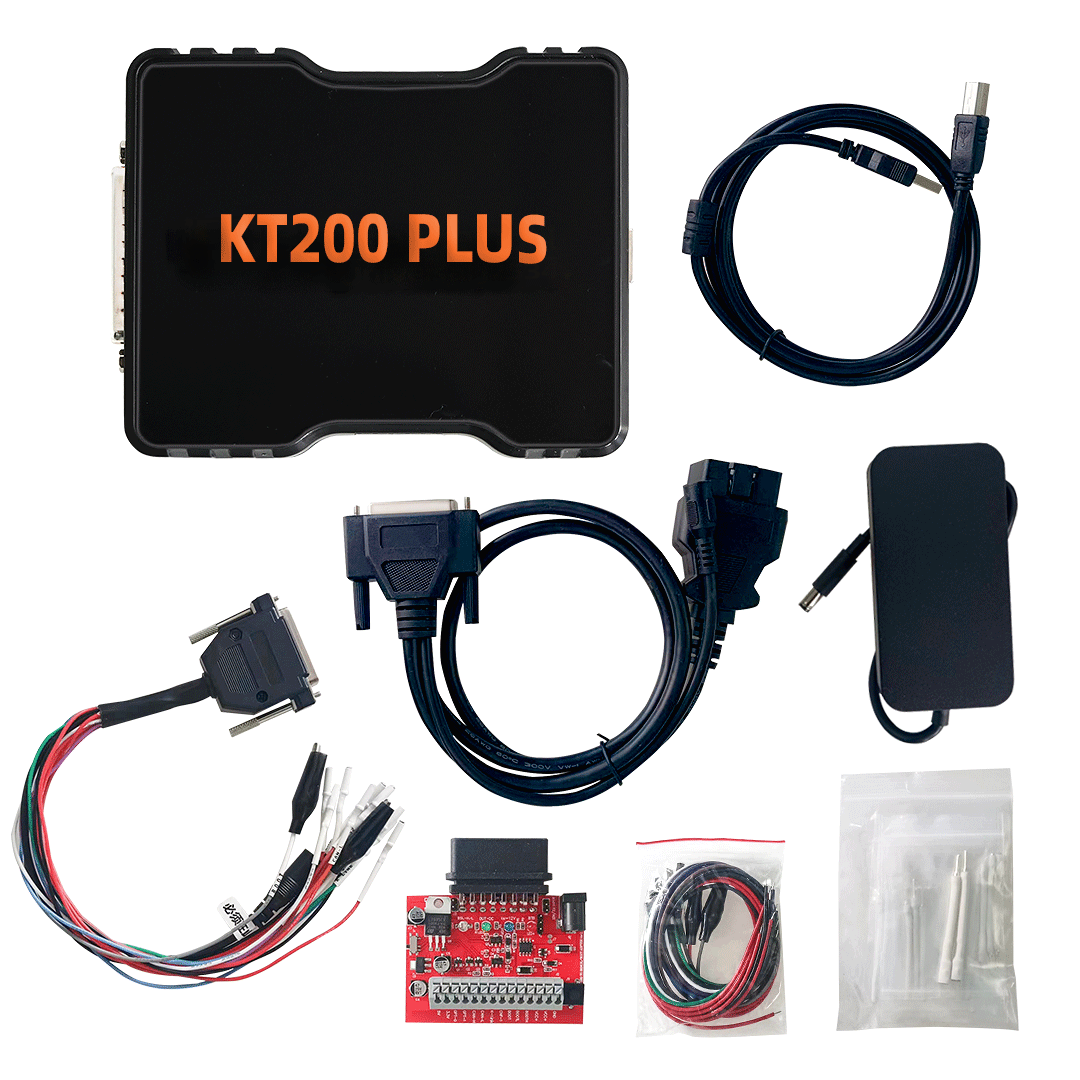
KT200 Plus is a professional ECU and TCU programming tool designed for automotive workshops, tuning professionals, ECU repair technicians, and vehicle electronics specialists. One of the most important things to understand before using any ECU programming tool is the connection method.
In ECU and TCU programming, different control units require different operation modes. Some ECUs can be accessed through the vehicle diagnostic port, while others require direct Bench connection or Boot-level access. Choosing the correct method is important for safe, stable, and successful ECU programming.
This guide explains the difference between OBD mode, Bench mode, and Boot mode when using KT200 Plus.
Why Operation Mode Matters
An ECU or TCU is not always accessed in the same way. The correct programming method depends on several factors, including the vehicle model, ECU brand, ECU type, microcontroller, protocol support, software version, and the operation you want to perform.
Before using KT200 Plus, users should always check:
- Vehicle brand
- Vehicle model
- Vehicle year
- Engine type
- ECU or TCU brand
- ECU or TCU type
- Supported protocol
- Supported connection method
- Required operation, such as read, write, backup, clone, or recovery
If the wrong connection method is used, the tool may not communicate with the ECU, or the operation may fail. In some cases, incorrect connection or unstable power supply may cause ECU damage or data loss.
What Is OBD Mode?
OBD mode uses the vehicle diagnostic port to communicate with the ECU or TCU. This is usually the most convenient method when supported because the control unit can often remain installed in the vehicle.
For many technicians, OBD mode is the fastest and cleanest way to perform supported read and write operations.
Advantages of OBD Mode
OBD mode is popular because it is convenient and does not usually require ECU removal. It can save time in workshop environments when the vehicle and ECU protocol support this method.
Typical advantages include:
- Access through the vehicle diagnostic port
- No need to open or remove the ECU in supported cases
- Faster preparation compared with direct ECU connection
- Suitable for many routine supported operations
- Convenient for workshop and service use
When to Use OBD Mode
Use OBD mode when the supported vehicle database confirms that the vehicle and ECU support OBD read or write operation.
OBD mode is suitable when:
- The vehicle is listed as supported by OBD
- The ECU protocol allows diagnostic-port communication
- The operation does not require direct ECU access
- The vehicle battery and power supply are stable
- The user wants a faster vehicle-side workflow
Limitations of OBD Mode
OBD mode is convenient, but it is not available for every vehicle or ECU. Some ECUs block certain operations through OBD or require a different method for full access.
Possible limitations include:
- Not every ECU supports OBD programming
- Some operations may be read-only or limited
- Communication may depend on vehicle condition
- A stable battery voltage is still required
- Some advanced operations may require Bench or Boot mode
What Is Bench Mode?
Bench mode connects directly to the ECU or TCU through a controlled external setup. The ECU may be removed from the vehicle, or the user may connect directly to the control unit using the correct wiring and power supply.
Bench mode is widely used in professional ECU and TCU service because it provides direct communication with the control unit.
Advantages of Bench Mode
Bench mode is useful when a direct connection is required or preferred. It gives technicians a more controlled environment for ECU or TCU programming.
Typical advantages include:
- Direct ECU or TCU communication
- Useful for workshop bench setups
- Often more stable than vehicle-side access in certain cases
- Suitable for ECU and TCU service workflows
- Useful when OBD is not available or not recommended
When to Use Bench Mode
Use Bench mode when the supported database lists Bench as the correct connection method for the ECU or TCU.
Bench mode is suitable when:
- The ECU or TCU supports direct Bench communication
- OBD mode is not supported for the required operation
- The technician wants to work outside the vehicle
- The ECU or TCU requires direct power and communication connection
- A controlled workshop setup is available
What to Prepare for Bench Mode
Before using Bench mode, users should prepare carefully. A stable power supply and correct pin connection are very important.
Recommended preparation includes:
- Confirm the ECU or TCU type
- Check the supported connection method
- Use correct cables and adapters
- Use stable power supply
- Avoid loose wiring or poor contact
- Make a backup where supported
- Do not interrupt the operation
What Is Boot Mode?
Boot mode is a more advanced ECU access method. It is usually used when deeper access to the ECU microcontroller is required. Boot mode may be necessary for selected ECU read, write, recovery, or service operations.
Compared with OBD and Bench mode, Boot mode normally requires more technical knowledge and careful connection.
Advantages of Boot Mode
Boot mode can provide access to selected ECUs when standard communication is not available or when advanced operations are required.
Typical advantages include:
- Advanced ECU access
- Useful for selected recovery scenarios
- May support deeper microcontroller-level operations
- Helpful for professional ECU service and repair
- Useful when required by the ECU type
When to Use Boot Mode
Use Boot mode only when the supported vehicle or ECU database indicates that Boot mode is required or supported for the operation.
Boot mode may be used when:
- OBD mode is not supported
- Bench mode is not enough for the required operation
- The ECU requires Boot-level access
- A recovery or advanced programming operation is needed
- The technician understands the correct connection procedure
Boot Mode Requires Experience
Boot mode is not recommended for users who do not understand ECU programming basics. It may require opening the ECU, identifying correct connection points, using a stable power supply, and following the correct procedure.
Before using Boot mode, users should:
- Confirm the ECU type
- Confirm Boot mode support
- Prepare correct connection tools
- Use a stable power supply
- Make a backup whenever possible
- Avoid short circuits or incorrect wiring
- Follow the recommended operation workflow
OBD vs Bench vs Boot: Quick Comparison
| Mode | Connection Method | Difficulty | Typical Use | Best For |
|---|---|---|---|---|
| OBD Mode | Vehicle diagnostic port | Easy to Medium | Supported read/write through vehicle port | Fast workshop operation |
| Bench Mode | Direct ECU / TCU connection | Medium | Direct programming outside the vehicle | ECU and TCU service |
| Boot Mode | Boot-level ECU access | Advanced | Advanced read/write or recovery | Professional ECU repair |
This comparison is only a general guide. The correct method always depends on the specific vehicle, ECU, TCU, protocol, and supported database information.
Which Mode Should You Choose?
The best mode is not the same for every vehicle. Users should not choose the mode based only on convenience. The correct method must match the supported ECU or TCU protocol.
A practical workflow is:
- Search the vehicle or ECU in the supported database.
- Confirm whether the operation supports OBD, Bench, Boot, or another method.
- Check whether the operation is read, write, clone, backup, recovery, or service.
- Prepare the correct KT200 Plus software and accessories.
- Use stable power supply.
- Make a backup where supported.
- Start the operation only after confirming the correct method.
Common Mistakes to Avoid
Many ECU programming problems are caused by incorrect preparation rather than the tool itself. Users should avoid the following mistakes:
- Trying OBD mode when only Bench or Boot is supported
- Using unstable vehicle battery voltage
- Interrupting read/write operations
- Using incorrect cables or connection points
- Installing unofficial or unknown software
- Skipping backup before writing data
- Ignoring the supported vehicle list
- Performing advanced operations without enough experience
Professional ECU programming requires careful preparation. A few minutes of checking before operation can prevent many problems.
Why Check the Supported Vehicle Database First?
KT200 Plus is designed to support many ECU and TCU programming scenarios, but no tool supports every vehicle, ECU, TCU, and operation in the same way. The supported vehicle database helps users confirm whether a vehicle or control unit is supported before operation.
When checking support, look for:
- Vehicle brand and model
- ECU or TCU brand
- ECU or TCU type
- Microcontroller or chip information
- Supported operation mode
- Read/write availability
- Special notes or connection requirements
If you are not sure, contact support before operation.
Professional Use Notice
KT200 Plus is a professional ECU and TCU programming tool. Incorrect operation may cause ECU damage, communication failure, data loss, or vehicle faults. Users should understand the risks and use the tool only for legal and authorized automotive service work.
For safer operation:
- Use a stable power supply
- Confirm the correct mode before operation
- Use official software
- Make a backup whenever possible
- Do not interrupt communication
- Contact support when unsure
Conclusion
OBD, Bench, and Boot mode are three important ECU programming methods. OBD mode is convenient when supported, Bench mode provides direct ECU or TCU communication, and Boot mode is used for selected advanced operations.
When using KT200 Plus, the correct mode should always be selected according to the supported vehicle database and the specific ECU or TCU type. Before programming, confirm compatibility, prepare the correct connection, use stable power, and make a backup where possible.
If you are unsure which method to use, contact support with your vehicle and ECU details before starting the operation.
FAQ
Does KT200 Plus support OBD mode?
Yes, KT200 Plus supports OBD operations for selected vehicles and ECUs where the protocol allows communication through the diagnostic port.
Is Bench mode better than OBD mode?
Bench mode is not always better, but it is useful when direct ECU or TCU communication is required. If OBD is supported for the required operation, OBD may be more convenient.
Is Boot mode difficult?
Boot mode is more advanced than OBD and many Bench operations. It should be used by technicians who understand ECU connection, power supply, backup, and programming procedures.
Can I choose any mode I want?
No. The correct mode depends on the vehicle, ECU or TCU type, and supported protocol. Always check the supported database first.
What should I send to support before buying?
Send the vehicle brand, model, year, engine, ECU or TCU brand, ECU type, and the operation you want to perform. This helps support confirm compatibility faster.



Comments (7)